
For gamers and software developers, the screen is not just a tool; it is a portal to performance. Whether you are debugging a complex backend architecture or tracking a target in a high-stakes ranked match, your eyes are the primary input device. You wouldn't settle for a mouse with input lag or a keyboard with sticking switches, yet many of us neglect the most critical piece of hardware we own: our visual system.
Sustaining high-level performance requires more than just caffeine and determination. It requires a visual system that is resilient, hydrated, and properly rested. The concept of "visual endurance" is becoming increasingly relevant in the esports and tech industries. Just as an athlete trains their body to withstand physical stress, digital professionals must adopt specific habits to maintain visual clarity and comfort over long sessions.
The Mechanics of Screen Fatigue
To prevent fatigue, we first need to understand what is happening biologically when we stare at a display. Unlike the real world, where our eyes constantly shift focus between varying distances, a screen requires us to lock our focus at a fixed distance (usually 20-24 inches) for hours at a time. This requires a sustained contraction of the ciliary muscles the tiny muscles inside the eye that control the lens shape.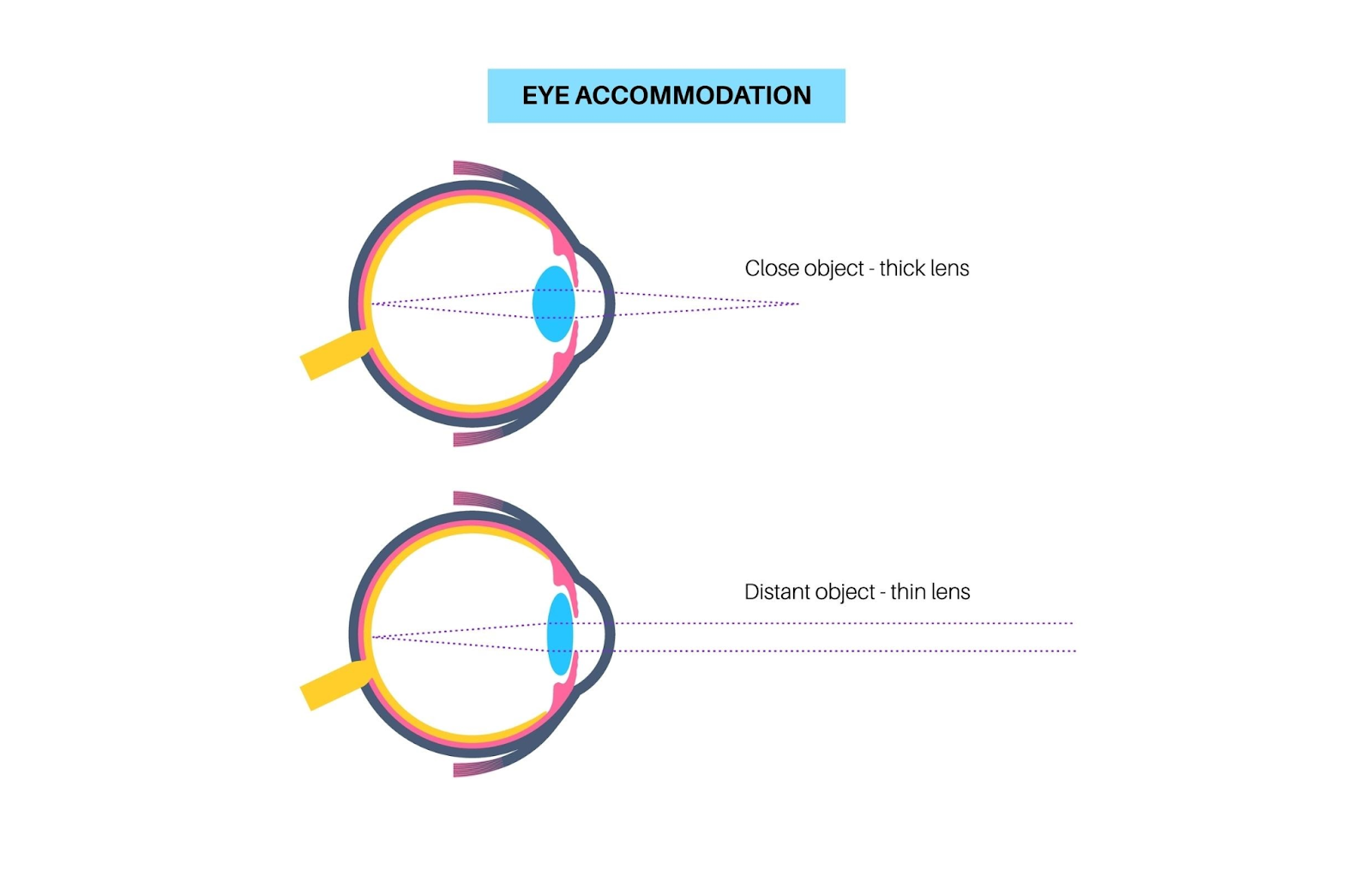
Simultaneously, the extraocular muscles must keep the eyes converged (turned slightly inward) to maintain a single image. When you spend hours tracking enemies or debugging code, your visual system is under constant tension. This prolonged exertion often leads to Digital eye strain, a condition that feels like your eyes have run a marathon without moving. It creates a barrier to performance, causing your focus to drift and your reaction times to slow down right when you need them most.
By understanding that this is a muscular and neurological challenge, we can implement active recovery strategies rather than just passively hoping for the best.
Optimize Your "Battlestation" Ergonomics
Your physical environment sets the baseline for your visual comfort. A poorly set up desk forces your eyes to work harder than necessary.
-
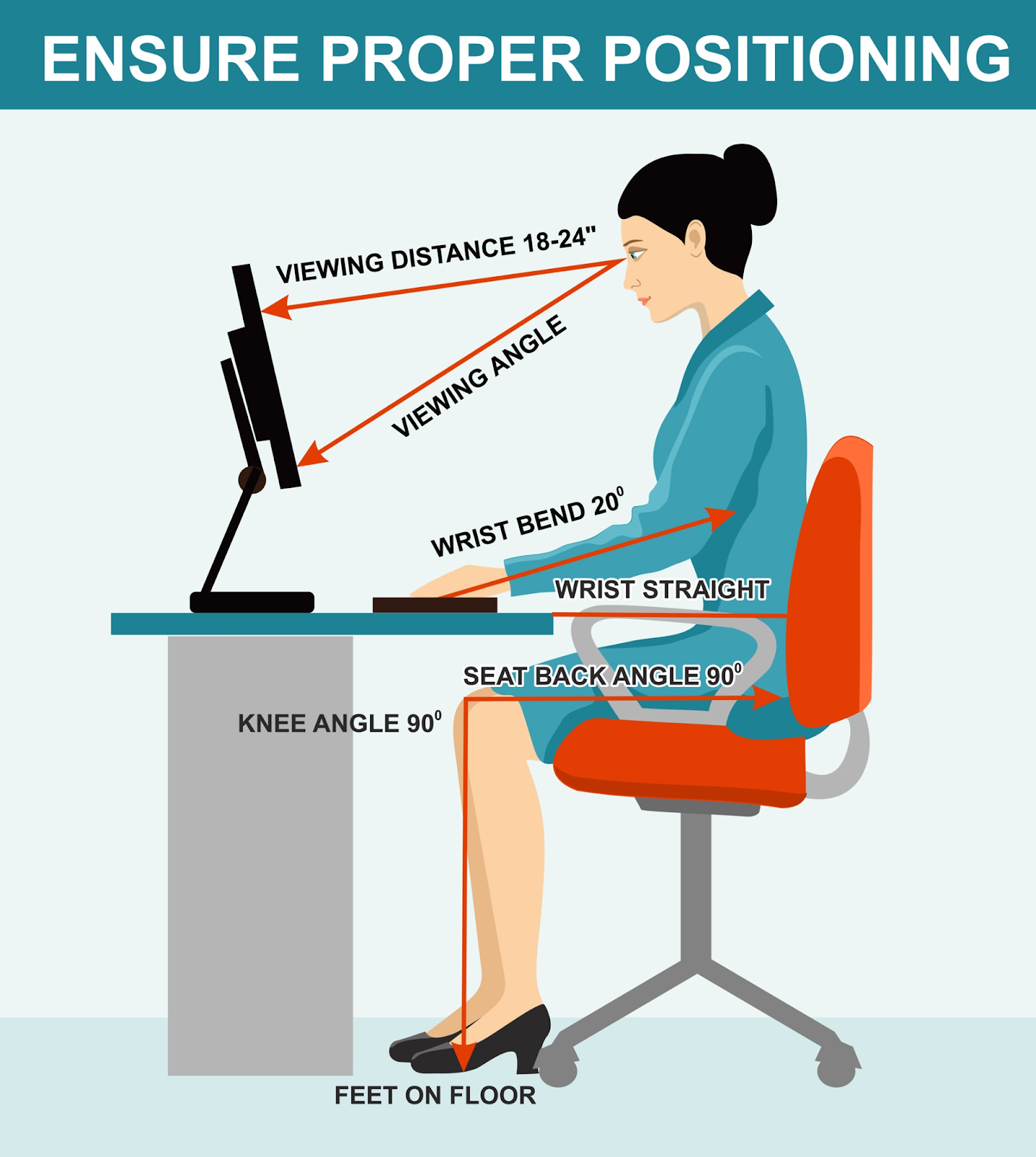
The Monitor Distance: Keep your screen at arm's length (about 20 to 26 inches away). If it is too close, your eyes have to converge aggressively to keep the image single. If it is too far, you might find yourself leaning forward (turtling), which ruins your posture.
-
The Gaze Angle: The top of your monitor should be at or slightly below eye level. This forces you to look slightly downward, which naturally lowers your eyelids. This simple trick reduces the exposed surface area of your eyeball, minimizing evaporation and keeping your eyes moister.
-
Refresh Rates Matter: For gamers, a higher refresh rate isn't just about smooth gameplay; it is easier on the eyes. Low refresh rates (under 60Hz) can have imperceptible flicker that taxes the brain’s visual cortex.
Mastering the Blink
It sounds automatic, but blinking is the first thing to suffer during intense concentration. In a normal conversation, you might blink 15-20 times a minute. During a coding sprint or a boss fight, that number can drop to fewer than 5 times a minute.
This lack of blinking causes the tear film—the layer of liquid that protects and nourishes the cornea—to break up. When the tear film becomes uneven, light scatters before it enters the eye, causing subtle blur and forcing your eyes to refocus constantly.
The Habit: Practice "complete blinking." Many screen users only partially close their eyes. Every time you hit a loading screen or compile code, take a second to close your eyes firmly (without squeezing) for a full second. This pumps fresh oil from the meibomian glands across the surface of the eye, stabilizing your vision.
The 20-20-20 Rule: The Reset Button
This is the golden rule of optometry for a reason: it works. The goal is to break the spasm of the focusing muscles.
-
Every 20 minutes: Take a pause.
-
Look 20 feet away: Focus on something in the distance (out a window or down a hallway).
-
For 20 seconds: Let the image clear.
For developers, this is a great time to think through logic without staring at the syntax. For gamers, this can be done during respawn timers or matchmaking queues. Looking into the distance relaxes the ciliary muscles, allowing them to unclench and recover before the next round of near-work.
Lighting and Contrast Control
The lighting in your room should communicate with your screen, not fight against it. A common mistake is working in a pitch-black room with a bright monitor. This creates a high-contrast environment that acts like a flashlight shining in your eyes, causing the pupil to constantly dilate and constrict.
The Solution: Use bias lighting. This involves placing a soft, warm light source behind your monitor. It raises the ambient light level of the room just enough to reduce the contrast ratio between the screen and the wall, significantly reducing the workload on your visual system.
Binocular Vision Exercises
Sometimes, the issue isn't focus, but coordination. If your eyes struggle to work as a team, you might experience "visual jitter" or difficulty tracking moving text. Simple exercises can help maintain strong binocular function.
Pencil Push-Ups:
-
Hold a pen at arm's length.
-
Focus on the tip.
-
Slowly bring it toward your nose, keeping the tip single.
-
Stop when it doubles, then push it back out.
This exercise strengthens the convergence system, ensuring your eyes can lock onto near targets accurately without drifting.
Managing Blue Light Exposure
While the sun is the largest source of blue light, our screens emit a significant amount of high-energy visible (HEV) light. Excessive exposure, especially late at night, can disrupt circadian rhythms and contribute to visual discomfort.
Most modern operating systems and monitors have built-in "Night Light" or "Eye Saver" modes. Schedule these to turn on automatically as the sun sets. The warmer color temperature is softer on the retina and signals to your brain that it is time to wind down, protecting both your sleep and your sight.
Conclusion
Building a career in tech or gaming doesn't have to cost you your vision. By treating your eyes with the same respect you treat your GPU or your code quality, you can ensure longevity in your field. These daily habits—optimizing your setup, blinking consciously, and taking frequent focus breaks—are small investments that yield massive returns in comfort and performance. Remember, your eyes are the interface between your mind and the digital world; keeping them sharp is the ultimate competitive advantage.
Frequently Asked Questions (FAQs)
Q: Does dark mode actually help my eyes?
A: Dark mode can reduce the overall brightness output of the screen, which many people find comfortable in low-light environments. However, for some individuals with astigmatism, white text on a black background can cause a "halo" effect, making text harder to read. It is best to use whatever mode allows you to read with the least amount of squinting.
Q: Are gaming glasses worth the investment?
A: Gaming glasses usually feature a yellow tint and anti-reflective coating. They can be helpful for improving contrast and filtering out blue light, which may improve comfort during long sessions. However, they are not a cure-all and should be used in conjunction with good visual habits.
Q: Why do my eyes feel dry even if I drink water?
A: Systemic hydration is important, but eye dryness while gaming is usually caused by a lack of blinking (evaporative dry eye). Drinking water helps, but physically blinking more often and using artificial tears are more direct ways to rehydrate the eye surface.
Q: Can a better monitor reduce headaches?
A: Yes, in many cases. Monitors with higher refresh rates (120Hz+) and "flicker-free" technology provide a more stable image. This reduces the micro-adjustments your brain has to make, which can lower the likelihood of triggering headaches during fast-paced motion.
Q: How often should I get an eye exam?
A: If you are a heavy screen user, an annual comprehensive eye exam is recommended. It is important to check not just for 20/20 acuity, but also for how well your eyes work together (binocular vision) at a near distance.

 English
 Arabic
 French
 Spanish
 Portuguese
 Deutsch
 Turkish
 Dutch
Dutch
 Italiano
 Russian
 Romaian